

Here's what we've learned about some common issues with these payment processors.
- How PBS/Nets/Teller pays out MasterCard and VISA transactions
- When PayPal Payments Don't Get through to Simplero, Even Though They're Paid in PayPal
- My Customers' QuickPay Transaction Didn’t Register in Simplero?
- I'm trying to refund my customer, and it's not working
- Paypal is not showing as an available payment option
- PayPal is not showing as an available payment method on the manage payment page
- Capturing a Stripe authorized payment is returning an error
How PBS/Nets/Teller pays out MasterCard and VISA transactions
When your customers pay with MasterCard or VISA, you don't get your money right away.
Instead, they're paid out weekly, accompanied by a PDF statement which you receive by email from Teller.
The transaction on your bank statement will say something like "FNR. xxxxxxx" where xxxxxxx is your 7-digit PBS/Nets/Teller merchant number.
The weekly PDF statement, called an "Advisering", contains a reference to a Ref. Nr. of the form " 000BILPxxxxx", where xxxxx is the transaction ID, which you will find next to the invoice when you click on Reporting > Invoices in your admin interface.
When PayPal Payments Don't Get through to Simplero, Even Though They're Paid in PayPal
The purchase shows Abandoned and the charge as New in Simplero

Sometimes a PayPal payment doesn't register in Simplero, even though it's gone through in PayPal. The way Simplero knows that the payment has gone through is that PayPal sends us what's called an IPN, short for Instant Payment Notification.
Without this, we have no way of knowing the transaction went through. So if this doesn't get to us, that's a problem.
Follow the instructions in this article to resolve the issue moving forward.
The purchase shows Abandoned, and the charge shows Succeeded
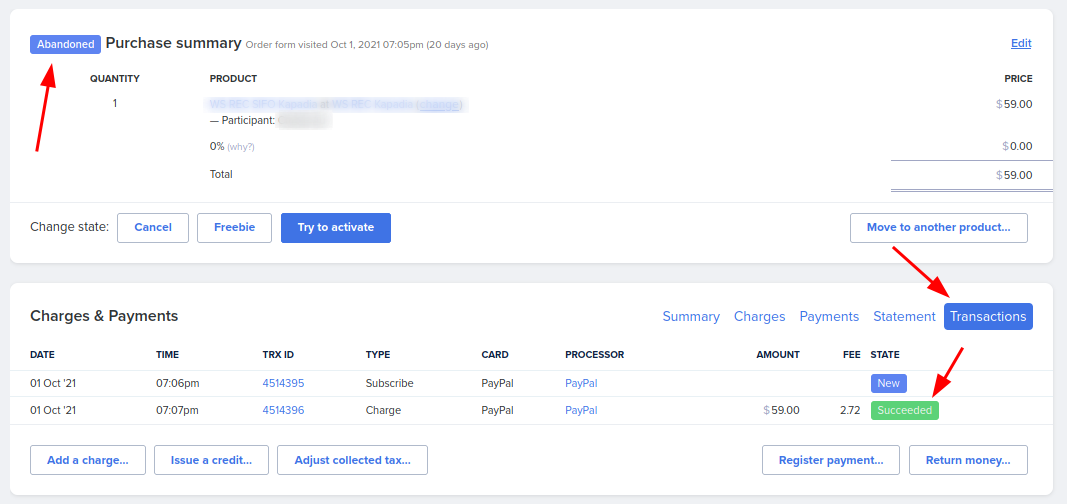
These cases are very likely due to PayPal returning the status "Pending" instead of successful at the time of the purchase. Then, later on, updating to successful.
When this happens, you can click on "Try to activate" to update the purchase status.

My Customers' QuickPay Transaction Didn’t Register in Simplero?
What happened here is QuickPays server didn't communicate with us that the payment was successful. As this is on QuickPays' side, there is nothing we can do about that.
However, what you do need to do in Simplero is register the payment manually. This is VERY important in order to keep your accounting accurate and avoid any discrepancies.
Here's what you need to do:
-
Log in to your QuickPay Manager
-
Confirm the payment went through
-
Once you've confirmed the payment, you'll need to register the payment in Simplero
-
Select Products from your Simplero Dashboard
-
Select the Purchases tab
-
Locate and select the purchaser (customer's name)
-
In the Charges & Payment section, click the Register payment button

-
The Register payment screen will open

-
Enter the amount received, select the date paid, and the method. Add a comment so you can identify the payment in the future. You could add something like "QuickPay Network Error" and be sure to double-check that the amount is accurate.
-
Once all looks correct, click the Register payment button to save
-
-
The purchase will now have a registered payment. The owing charge should match with the payment you just registered.
I'm trying to refund my customer, and it's not working.
Payment processors often have time limits on refunds. If you are trying to refund an older purchase that is past the payment processor's refund period, it will register that they've been refunded in Simplero, but no transaction will have gone through on the processor.
If this is the case, you'll need to refund the customer their money some other way (perhaps by sending them a check).
Here are the refund periods for our common payment processors. If you are having trouble refunding with a payment processor not listed here, be sure to check with them what their refund period is:
- Stripe - No technical limit, but they recommend no longer than 6 months, as more than 6 months increases the likelihood of issues (such as cards being declined)
- Paypal - 6 months
- Quickpay - 1 year
- Authorize.net - 6 months (but also you can't refund within 24 hours of purchase. So if this is the case, just wait a day and try again)
Paypal is not showing as an available payment option
-
Upsell and order bump products are not available via PayPal. - If PayPal is not showing as an available payment processor on the product order form, make sure the product does not have any available upsells.
- If you are using Automatic PayPal subscriptions, some prices might not be showing. Have a look at this guide to understand the limitations. Some of those are:
- Prices with 3 periods or more are not supported by PayPal.
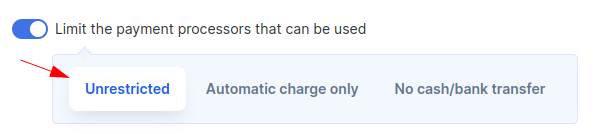
- If the price has more than 2 different periods, it needs to support Unrestricted Payment Processors or No cash/bank transfer.
PayPal is not showing as an available payment method on the manage payment page
Once a purchase has been created (either manually or through the product order form) and a payment method has been selected, PayPal will no longer show up as an available payment method. Even though it is available as a payment method in the price settings.
The reason is that PayPal cannot be set up unless a charge is due.
As soon as you add an outstanding charge, PayPal will show up as an available payment method in the manage payment page.
Capturing a Stripe authorized payment is returning an error
If you get an error saying: This PaymentIntent could not be captured because it has a status of canceled. Only a PaymentIntent with one of the following statuses may be captured: requires_capture

Note that Authorize lasts “up to seven days" - If the purchase was created before 7 days ago, Stripe is not letting us collect the money, and you may need to ask the end-user to place a new order.
Suite 92530
New York, NY 10003
United States
