

Use Merge Fields to Register a Subscriber for a Webinar
Have you ever wanted to sign up your webinar attendees for your webinar by using Simplero instead of using the webinar provider's sign up function?
There could be several reasons for wanting this:
- You're running a webinar launch with affiliates and want to be able to track the affiliation when they sign up for the webinar. This can be really difficult using 3rd party sign-ups.
- You want to track their GDPR consent using Simplero’s functions.
- You don't want to have to use and pay for yet another piece of software (like Zapier) to move them to Simplero after they sign up for the webinar.
We now have a solution that will make it possible to sign up your registrants on a Simplero list and add them to the webinar at the same time!
You need the one-click code from your webinar provider.
If you're using WebinarJam,
- Go to your WebinarJam dashboard
- Select the Advanced settings for the webinar you want
- Select the one-click registration option and copy the code.
This will give you code like this: 
Edit the code to use the Simplero merge fields codes: 
You want it to look like this: 
Now,
- Create a list in Simplero for the webinar (remember to set your preferred GDPR and double opt-in confirmation settings).
- You probably want the webinar program to send the pre-webinar mails.
- If not, set up your auto responses in Simplero.
- Then make an awesome sign-up form!
After that,
- Select Contacts from your Simplero Dashboard
- Select the Lists tab
- Select the List you've created for your Webinar
- Select the Content tab
- Scroll down to the Custom Pages section
- Paste in the edited one-click URL you copied from your webinar provider in the Custom 'you have successfully subscribed' page area
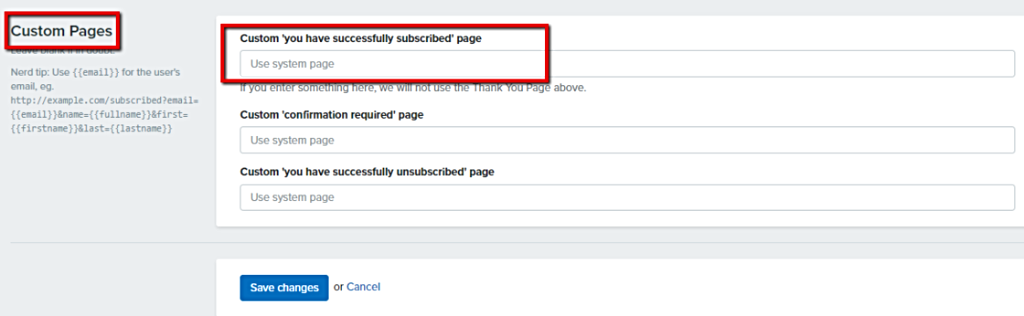
- Click the blue Save changes button
Success!
When someone signs up to this list using your Simplero sign up page, they will be taken to the webinar one-click registration page as their thank you page. Simplero will fill in their name and email information, so the webinar provider can add them to your webinar registration list.

___MESSAGE___
___MESSAGE___