

Full (Dark UI) Help & Knowledge Base
Full (Light UI) Help & Knowledge Base
⌘K
Help Guides
Calendar
tTraining Workshops
Favorites
Playlists
History
Media Library

Media Versioning (Videos, Audios and Pdf)

You can replace an existing version of a video using the top right button 'Replace...'

  1. Upload the file from your local device

  2. The new version will show as uploading at the top

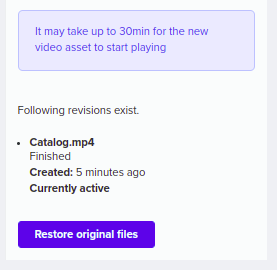
Once the new version has been uploaded, it can take up to 30 minutes to be fully replaced.

All versions uploaded will be shown on the right sidebar where you can switch from one to another.

Use ‘Revert original’ to blast all revisions and revert to the original file version.
Find in your settings - media files the option to remove versions after a week of being added.
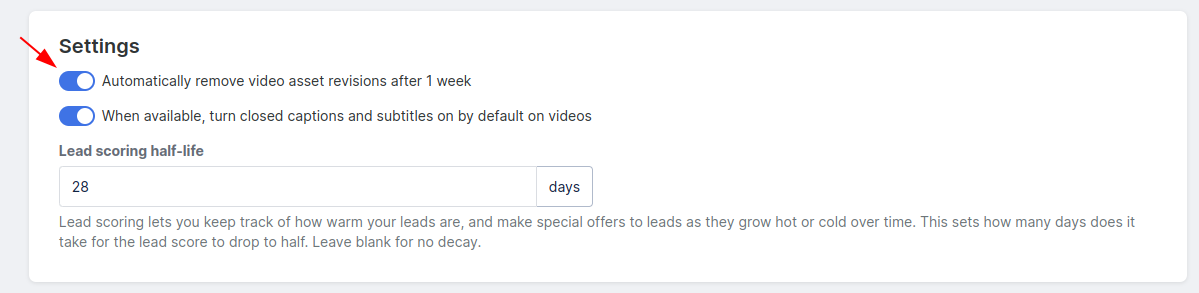
NOTE! This feature is only available for Audios, Videos and PDFs (not Images).

Completed Mark as complete
Simplero
Features Why Simplero? About Pricing
Partner
Become a Partner Work at Simplero Get certified
Get Help
Support Guides Concierge Certified Experts Implementation Workshops
Tools
Mobile App Simplero Coach
Resources
Online Course Creation Guide
Compare
Kajabi Teachable Thinkific ClickFunnels Kit (ConvertKit) Skool Lumant Mighty Networks Circle ActiveCampaign Keap/InfusionSoft WordPress
Legal
Privacy Policy Terms of Service Disclaimer
Copyright © 2026 Powerful Through Grace, Inc. dba Simplero · 1 Chestnut Hill Plaza ·#1139 ·Newark, DE 19713·United States
powered by