

Full (Dark UI) Help & Knowledge Base
Full (Light UI) Help & Knowledge Base
⌘K
Help Guides
Calendar
tTraining Workshops
Favorites
Playlists
History
Deprecated Features › Spaces

[Spaces] Rearranging the Tabs/Pages/Subpages Within a Space (deprecated)

Rearrange Pages and Subpages in a Space

To rearrange the pages in your Space menu or to move subpages from one tab to another or to reorder any pages or sub-pages you will need to follow the following quick steps...

  1. Open the space you want to edit
  2. Go to the content tab 
  3. You will now see your site structure, select the red link that reads Reorder/Move pages
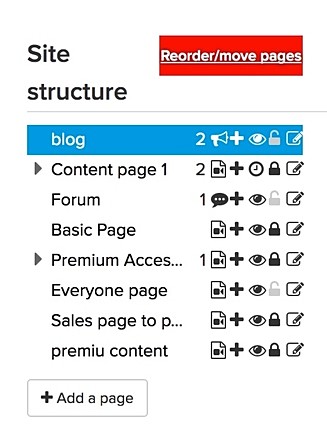
    Space-pages-1-medium.jpg
  4. Select the Page/SubSubpage you want to move and drag it to it's new location
  5. Repeat step 4 until all pages are moved
  6. Select the blue Done Reordering button at the top
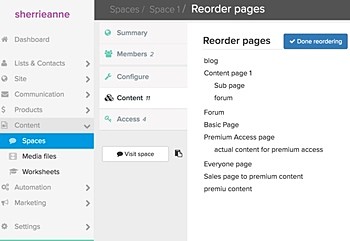
    Space-pages-2-medium.jpg
Completed Mark as complete
Simplero
Features Why Simplero? About Pricing
Partner
Become a Partner Work at Simplero Get certified
Get Help
Support Guides Concierge Certified Experts Implementation Workshops
Tools
Mobile App Simplero Coach
Resources
Online Course Creation Guide
Compare
Kajabi Teachable Thinkific ClickFunnels Kit (ConvertKit) Skool Lumant Mighty Networks Circle ActiveCampaign Keap/InfusionSoft WordPress
Legal
Privacy Policy Terms of Service Disclaimer
Copyright © 2026 Powerful Through Grace, Inc. dba Simplero · 1 Chestnut Hill Plaza ·#1139 ·Newark, DE 19713·United States
powered by