

Account Location and Language
In this guide:
Account Language
This is for the language that your customers see.
-
Select Settings from your Simplero Dashboard
-
Select the Account tab
-
Scroll down to the Localization section
-
In the Customer language area, choose the default language that your customers see
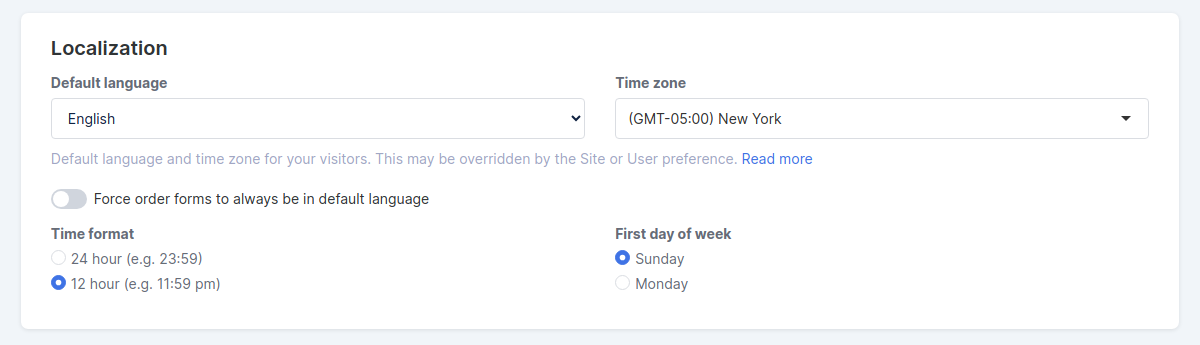
But the logic is actually quite a bit smarter than that. Here's how it works:
When someone visits the site, we choose a language based on the following order:
-
If a locale has been set using query parameters (see below), we use that
-
If the visitor is logged in, we take that user's preferred language (can be changed in the user menu in the top-right corner)
-
If the browser has a preference for a language, we'll use whichever is highest (you can set this preference in your browser)
-
Otherwise, we will use the locale you have chosen under Settings > Account
The user preference can be a little confusing to you as an Admin if you run an account with multiple languages, since when you are logged in, you will always see your preferred language.
To test what others see, use another browser where you are not logged in, and pay attention to the language preference settings of your browser.
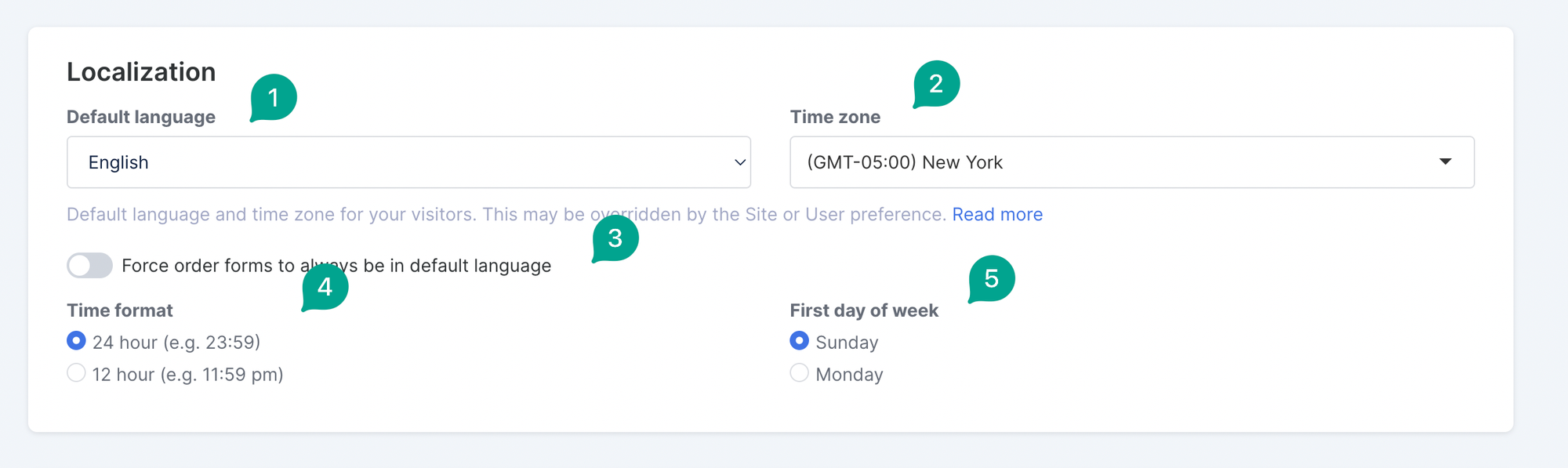
This is how these settings apply:
-
Default language is used in many places. Usually, setting the locale for a mail and site. Many times is often used as a fallback in the case we don’t know the user's preferred language.
-
Time zone setting is used for new event occurrences, purchase forecasts, and in some other places as a fallback in case we don’t know the visitor or user time zone.
-
When ‘Force order forms to always be in default language’ is turned ON, we override the user preferred language in order forms or in the shopping cart.
-
Time format is used for times displayed mainly on the Admin side. Used in places like site view, automation step, broadcast, and participant/subscriber status. Also used for Events start time format and end time format. It is used for Date Pickers time format.
-
First day of the week is used for stats in the admin. Also for the Upcoming Events calendar in the page builder.
Setting locale using query parameters
You can override the choice of locale by adding this snippet to any URL:
?locale=en for English or ?locale=da for Danish
When you do this, the choice of locale will stay for the remainder of the browsing session.
Thus, if you have a Simplero account primarily targeted towards the Danish market, but you want to send out a link to a product for an English-speaking audience, you can add the ?locale=en to the link, and you can be sure they will see things in English.
If you are running an international business, check out this guide for more support
Admin language
The language you see in the admin is separate from the language your customers see. Every administrator picks their own admin language.
-
Click your name in the top navigation bar of your admin.
-
Select Admin language.

-
Pick your language
Note: If a language is an alpha, most of the admin is translated, but some words may read oddly. Contact support if you notice any issues with those.
The admin reloads in the language you pick. Dates and numbers use that language's formatting, for example 1.000,50 and 1. januar 2025 in Danish. Your Time format setting still controls whether times show as 12-hour or 24-hour.
Your choice changes only your own view of the admin. Members, customers, and emails stay in the language of your account.
