

Understanding Simplero AI Credits
Simplero has two kinds of AI credits. Both are measured the same way — 1 AI credit = 1 USD — but they pay for different things, live in different places, and are topped up separately.
-
Account AI credits pay for AI inside your account: in your admin (transcripts, lesson descriptions, survey summaries), your bots, the AI your customers use on your sites, and Simpli's Better/Best replies. Billed to the account. Check them under Settings → AI Usage & Limits.
-
Coach credits pay only for conversations in Simplero Coach. Billed to each user, not the account. Check them under your profile picture → AI Usage.
Note: both balances are labeled "simplero AI credits" on screen — the difference is where you find them.
Quick rule of thumb: in Simplero Coach you're spending Coach credits. Everywhere else in your account, you're spending the account balance.
In this guide:
Simpli
Simpli is Simplero's built-in AI assistant (an AI helper that works inside your admin). Open it from the upper left corner of any page in your dashboard. 
The Simpli home page shows ideas to try and ready-made recipes for common tasks. Conversations are shared across the account, so every administrator sees the same history.
What Simpli can do
-
Build and change things across your account with your admin permissions: automations, funnels, landing pages, pages, courses, contacts, products, and more.
-
Every change shows as a reviewable card in the chat before it applies.
-
Answer how-to questions about Simplero.
Does Simpli use AI credits?
-
Standard replies are included with Simplero and do not use your AI credits.
-
Use the power slider to pick Better or Best for a stronger model.
-
Better and Best replies are paid from your account's AI credits. The slider shows the approximate credits per reply and your remaining balance.
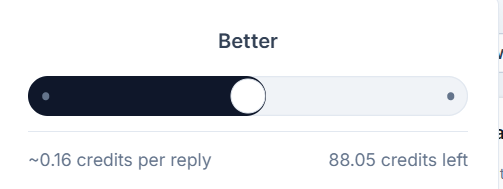
- When the account runs out of AI credits, Better and Best replies answer on Standard until you add more. Simpli shows a notice with a link to buy credits.
-
Account AI credits
Simplero AI Credits power AI features inside your Simplero account, including:
-
AI-generated transcripts
-
Other AI-generated content inside your account (lesson descriptions, survey summaries...)
-
AI-powered Bots that your customers interact with
-
Content generation and other AI-assisted features throughout Simplero
These credits are billed to the account owner (member).
For scale: 1 credit covers roughly 3 hours of video transcription.
Included Monthly Credits per Simplero plan
Every Simplero plan includes a monthly AI credit allowance:
|
Plan |
Included AI Credits |
|---|---|
|
Starter |
$5/month |
|
Scale |
$15/month |
|
Skyrocket |
$30/month |
|
Legacy Build |
$2/month |
|
Legacy Launch |
$10/month |
|
Legacy Rule The World |
$15/month |
Note: We reserve the right to change the limits and pricing at any point
Important:
-
This resets every 30 days on a rolling window (not a calendar month).
-
Trial accounts receive the same AI credit allowance included with their selected plan.
-
If you downgrade your plan, any credits you've already received remain available until they expire.
-
Unused AI credits accumulate and remain available until they expire. Credits expire 90 days after they are granted
Viewing your current balance and expiry dates
On your account Settings → AI Usage & Limits page (www.simplero.com/go/admin/account/ai), you can:
-
Check your current AI credit balance and expiry dates

-
View the full history of your credit usage by clicking the arrow next to "Credit balance":

Purchasing Additional Credits
If you run out of your included credits, purchase additional AI credits under Settings → AI Usage & Limits (www.simplero.com/go/admin/account/ai).
You'll be able to:
-
Purchase additional credits

-
Configure automatic top-ups

Selling AI Access to Your Customers
If you create custom Bots for your customers, you can:
-
Set a free usage allowance
-
Allow customers to purchase additional AI credits themselves
-
Add your own markup by creating a Credits product
For detailed instructions, see Selling AI access to your customers
Coach credits (per user)
These credits pay only for conversations in Simplero Coach — never for admin AI features, bots, or anything else in your account.
Included Monthly Allowance
Each Simplero user has a limited usage per month
This allowance is billed to each individual user and is not included in the account AI credits. When an administrator's allowance and personal credits run out, Simplero Coach draws from the account's AI credits, so a conversation does not stop mid-task.
What Happens When You Reach Your Limit?
You can view your usage in detail by clicking your profile picture → AI Usage:

This will show your current usage and the option to Buy more:

When your Coach credits are exhausted, you can purchase additional credits directly from your account and continue using Simplero Coach without interruption.
There is no service shutdown or waiting period. Add more credits and continue your conversation.
Understanding AI costs
These factors apply to both kinds of credits.
AI usage costs vary based on the model being used and the amount of work being performed.
The following factors have the biggest impact on cost:
1. Different Models Have Different Costs
Some AI models are more powerful and therefore more expensive to run.
Inside Simplero, you'll see a $ indicator next to models to help you understand their relative cost.

Lower-cost models are great for everyday tasks, while higher-cost models may provide stronger reasoning, writing, or analysis capabilities.
2. Larger Requests Cost More
The more work you ask AI to perform, the more credits it consumes.
Examples:
-
"Write a short email" → low usage
-
"Create a complete 10-module course with worksheets and exercises" → higher usage
3. More Reference Material Costs More
When AI needs to review additional information, costs increase.
Examples include:
-
Uploading documents
-
Referencing long articles
-
Asking AI to analyze multiple resources
-
Giving extensive context for a task
The more information the model processes, the more credits are used.
4. Longer Conversations Cost More
AI reviews previous messages in a conversation to maintain context.
As conversations become longer, the amount of information being processed grows, which can increase credit usage.
Starting a fresh conversation for a new topic can often be more efficient than continuing an extremely long thread.
5. What Does $10 per month of AI Usage Typically Look Like?
AI usage varies significantly depending on the model selected and the type of work being performed.
For most users, $10 per month typically covers:
-
Hundreds of everyday prompts
-
Regular content creation and brainstorming
-
Consistent use throughout the month
For heavy usage with premium models, credits may be consumed more quickly.
Because usage varies so widely between models and tasks, we recommend viewing your included allowance as a generous everyday usage budget rather than trying to estimate usage in minutes per day.
Your account will always show your remaining balance and usage history so you can monitor consumption in real time.
