Full (Dark UI) Help & Knowledge Base
Full (Light UI) Help & Knowledge Base
⌘K
Help Guides
Calendar
tTraining Workshops
Favorites
Playlists
History
Simplero Training Workshops › Content

Understanding AI in Simplero

Updated Aug 19, 2026

There are a lot of different ways AI shows up in Simplero, and it’s not always obvious which tool does what or where to start.

In this workshop, we take a tour through AI Search, Bots, Simplero Coach, Writing Tools, and external AI connections, with real examples of where each one fits. We also talk through AI credits, access, and some of the things worth knowing as you start putting these tools to work in your own account.

You’ll find the workshop PowerPoint and AI Quick Reference Guide below too, so you have something easy to come back to without rewatching the whole recording.


If you have 2 minutes, we'd love to get your feedback on our workshops.

Let us know your thoughts right here.

Understanding AI in Simplero - Workshop Deck (1).pptx
Understanding-AI-in-Simplero-Quick-Reference-Guide-thumb
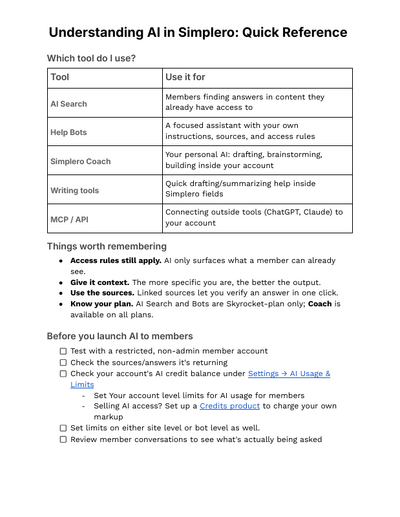
Understanding AI in Simplero Quick Reference Guide

Understanding AI in Simplero: Quick Reference

Which tool do I use?

Tool Use it for
AI Search Members finding answers in content they already have access to
Help Bots A focused assistant with your own instructions, sources, and access rules
Simplero Coach Your personal AI: drafting, brainstorming, building inside your account
Writing tools Quick drafting/summarizing help inside Simplero fields
MCP / API Connecting outside tools (ChatGPT, Claude) to your account

Things worth remembering

  • Access rules still apply. AI only surfaces what a member can already see.
  • Give it context. The more specific you are, the better the output.
  • Use the sources. Linked sources let you verify an answer in one click.
  • Know your plan. AI Search and Bots are Skyrocket-plan only; Coach is available on all plans.

Before you launch AI to members

  • Test with a restricted, non-admin member account
  • Check the sources/answers it's returning
  • Check your account's AI credit balance under Settings → AI Usage & Limits
      • Set Your account level limits for AI usage for members
      • Selling AI access? Set up a Credits product to charge your own markup
  • Set limits on either site level or bot level as well.
  • Review member conversations to see what's actually being asked
Completed Complete
Simplero
Features Why Simplero? About Pricing
Partner
Become a Partner Work at Simplero Get certified
Get Help
Support Guides Concierge Certified Experts Implementation Workshops
Tools
Mobile App Simplero Coach
Resources
Online Course Creation Guide
Compare
Kajabi Teachable Thinkific ClickFunnels Kit (ConvertKit) Skool Lumant Mighty Networks Circle ActiveCampaign Keap/InfusionSoft WordPress
Legal
Privacy Policy Terms of Service Disclaimer
Copyright © 2026 Powerful Through Grace, Inc. dba Simplero · 1 Chestnut Hill Plaza ·#1139 ·Newark, DE 19713·United States
powered by