

Adding a Charge to an Existing Purchase
Is your customer past due, wanting to split a payment, or maybe they requested to purchase an add-on product to a current product? To add the additional charge to their current purchase, follow the instructions below.
-
Locate the purchase. This can be done in 3 ways:
- Sales > Purchases tab> Search for the customer > Locating the purchase via the purchase screen
- Contacts > Contacts tab> Search for the person > Locate the purchased product via their contact screen
-
Products > Products tab> Locate the purchased product > Purchases tab > Search for the customer > Locate the purchase via the billing screen
- Once you have located the purchase, scroll down to the Charges & Payments box
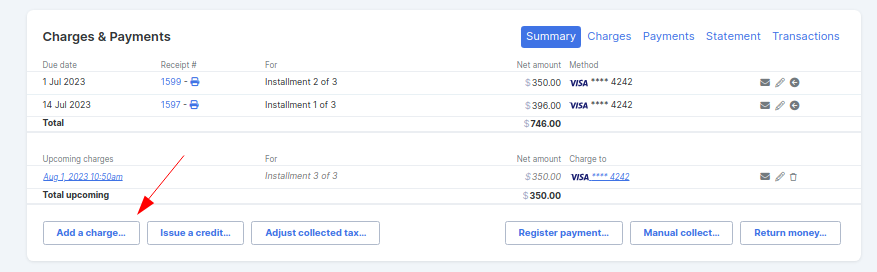
- Select the Summary tab and click the Add a charge button
-
Complete the charge information field and click the Create a charge button
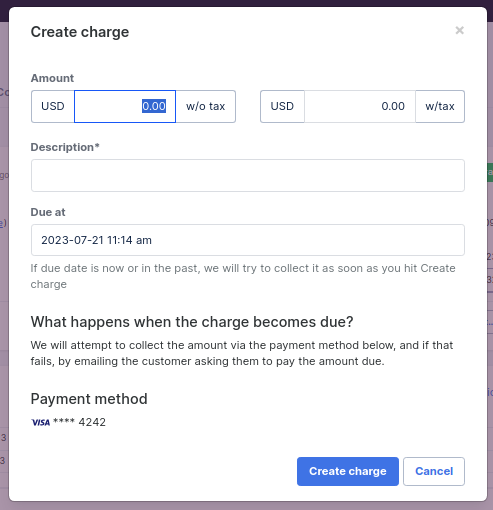
As long as the customer's purchase is still in the Paid state, the customer will then be charged or invoiced for the amount on the date you selected, depending on the payment processor they used to originally purchase.
-
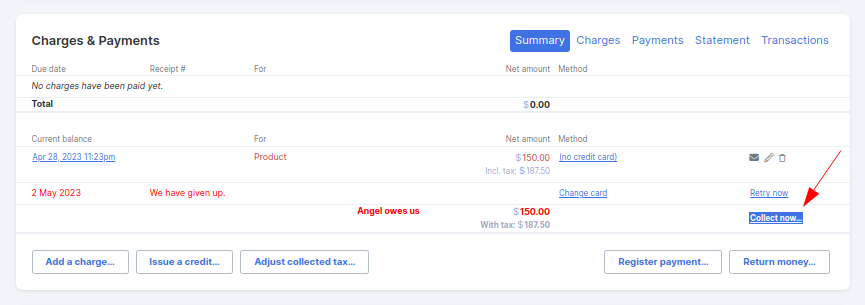
If the customer is in the Delinquent state, you will need to select the charge now button if the payment is due today.
-
If the customer is in a failed state, you will first need to reactivate them to back paid, then select the charge now button if the payment is due today.
-
If the customer is in the Free state, the system will generate the invoice for them to pay.
Splitting a Charge
If you are adding a charge because your customer is splitting a current charge into smaller amounts, remember to edit the first charge amount before adding the new one.
