Full (Dark UI) Help & Knowledge Base
Full (Light UI) Help & Knowledge Base
⌘K
Help Guides
Calendar
tTraining Workshops
Favorites
Playlists
History
Done-for-you campaigns

Done For You Campaigns

3 lessons
0 of 3 0 of 3 completed
0%
Done-for-you campaigns
Done-For-You Campaigns
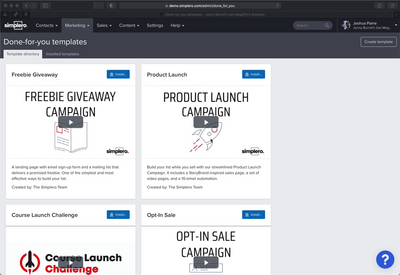
Simplero Built Campaigns Available • Create Your Own • Installing a Campaign  We are so excited to have created a way to share high-performing campaign templates with you!  With a few clicks, you can install the template for one of our campaigns (or on another Simplero user's campaign).  First, make sure they are enabled in the More menu: Now, you can find them on the Marketing >> Done-For-You Campaigns. As of today, there are 9 Done-For-You templates with the following content pre-built for you. Check on this section as the list keeps continuously growing. Bourbon Lead Funnel: a funnel, a list, and an automation. Course Launch Challenge: specific to the Course Launch Challenge we did at Simplero. Everest Lead funnel: funnel, list, and an automation Freebie Giveaway: a landing page and a mailing list. Opt-in Sale: Tags, and opt-in list, 2 automations, 2 emails, 2 landing pages and 11 broadcasts. Product Launch: Sales Page, video pages and 10-email automation. Product Survey: 3 broadcasts. Reviver Email Sequence: automation Soap Opera Email Sequence: automation Each campaign has its own particular settings when it comes to installing it, but the ones below are common to them all. From the Available tab, click on the campaign name to install… Fill in the installation settings: Label name Label color Prefix for created objects When you get the Campaign installed you will be able to quickly locate which objects belong to it thanks to the label and prefix automatically added to them all: When you install any of the Simplero Campaigns a checklist will show up on your dashboard to guide you through the content we’ve just created for you (so you don’t miss a single bit of it!). And if you would like to use this feature to create your own Opt-In campaign in just a few clicks, read on... You can create your own Done-For-You Campaigns too and share them with any Simplero member to get installed in their account. The first step is to label all those objects (lists, emails, automations, landing pages…etc) that you would like to be part of your new Done-For-You Campaign. You’ll notice that pretty much everything in Simplero can be labeled. That includes whole Sites as well as courses. Important note! If you are looking at installing your campaign including a course on a different Simplero account, you don’t need to label the media assets (videos, PDFs, images) for them to be installed. We do that automatically for you. Once you have labeled all your Campaign items, let’s get the Campaign ready to share! On the top right corner you’ll find the “Create new Done-For-You Campaign” button. Fill the details of your Campaign, choose the label that will the determine which objects are part of it and click on ‘Create Done-For-You template’! Now the template will be visible to all of your account administrators on any Simplero account they log in to. From the account the Campaign has been created on, you will be able to edit it and copy a shareable link: Installing a Campaign using the Share link With your Simplero account dashboard open on your browser, go ahead and paste the Campaign link on the URL and click ENTER. You will now be prompted with the screen below: If you are an admin on multiple Simplero accounts, you’ll be able to choose which account you’d like the Campaign to be installed on via a dropdown box:  Then, either Install now which will prompt you to create your own label for all content imported from the Campaign. The Prefix will automatically sync with the label you select:  or Save it for later. This would then show in the library of available to download campaigns so you can download it to your account later. Installed campaigns, are listed in the ‘Installed’ tab: If you click on the campaign name, you will be able to see which objects were installed through that campaign. Each item will have a link so you can go directly to edit those objects.  Important notes! If you are trying to install a course, you will also want to label the site it is on. Otherwise, it will automatically be added to your main site.  Installing Scheduling Links If installing the campaign on the same account then, owner & availability & calendar are preserved. If installing it on another Simplero account, then, we assign the scheduling link to the owner of the destination account. We use the owner's default calendar for creating events (or leave as 'No calendar' if it hasn't been linked). For availability presets, we try to find one availability that's similar to the one we are cloning (and create a new one if it doesn't exist). Segments are not supported in DFY campaigns as these are specific to the contacts you have in your account.  Have fun with it and let us know how it goes for you!
Make your own Done-for-you Templates
How to Create Your Own Done-For-You Campaigns
If you're someone who teaches others how to do things or manages accounts for people, you're going to LOVE this feature.  Even as someone running your own Simplero account, it's a great way to reuse your successful campaigns, and maybe even share them with your friends and the Simplero community. Here's How to Make Your Own Done-For-You Campaigns From your Simplero Dashboard, navigate to Marketing > Done-For-You Campaigns: This will take you to a page that shows you the templates we've created. On this page, if you click the Create your own Done-For-You button, you can create your own: Then add a name, pick the label that will be added to all elements inside the campaign and some other info, and Simplero will gather all of the objects with that label and make a Done-for-you campaign out of it: You can now share your campaign with others and reuse it as many times as you want!
Intro to Simplero- Email marketing
Done-For-You Campaigns
Done-for-you campaigns in Simplero are pre-built templates that can be easily installed with just a few clicks. Each template comes with specific content pre-built for various marketing purposes, such as landing pages, mailing lists, sales pages, video pages, automations, and email sequences. You can also create your own Done-For-You Campaigns by labeling the objects you want to include and sharing them with other Simplero members for installation.
Simplero
Features Why Simplero? About Pricing
Partner
Become a Partner Work at Simplero Get certified
Get Help
Support Guides Concierge Certified Experts Implementation Workshops
Tools
Mobile App Simplero Coach
Resources
Online Course Creation Guide
Compare
Kajabi Teachable Thinkific ClickFunnels Kit (ConvertKit) Skool Lumant Mighty Networks Circle ActiveCampaign Keap/InfusionSoft WordPress
Legal
Privacy Policy Terms of Service Disclaimer
Copyright © 2026 Powerful Through Grace, Inc. dba Simplero · 1 Chestnut Hill Plaza ·#1139 ·Newark, DE 19713·United States
powered by