

Override the Default Affiliate Commission
Each program has a default commission. However, you can override this at different levels:
- Overriding Affiliate Commission by Product
- Overriding Affiliate Commission on one specific Purchase
- Override the Commission for a Specific Affiliate
Overriding Affiliate Commission by Product
-
Select Products from your Simplero Dashboard
-
In the Products tab, create or select your Product
-
Select the Selling tab
-
Scroll down to the Affiliate Settings section and click the + Add affiliate program

-
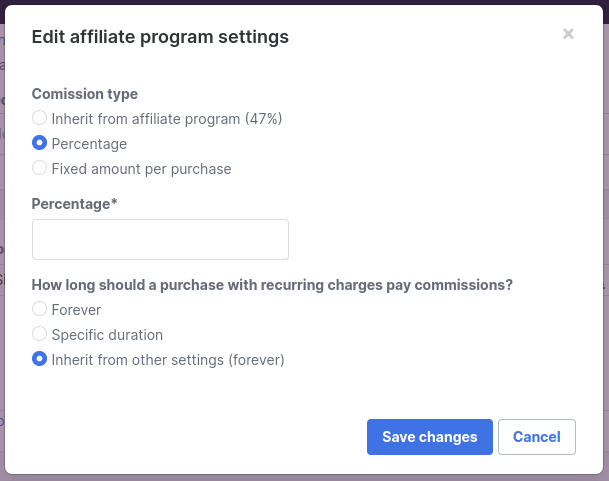
If a program and product are already connected and you want to change the % you can do so by simply clicking the Edit link to the right of the program name

-
Complete the fields accordingly and click the Save changes button
Overriding Affiliate Commission on one specific Purchase
- Go to Sales -> Purchases
- Find the purchase you want to edit the commission (or affiliate name)
- Inside the purchase, click on the edit pencil in the top right corner

- Find the affiliate section and edit the percentage or affiliate name

- Save changes and Done!
Note: The affiliate programme needs to be added to the product to be able to choose it on the purchase
Override the Commission for Specific Affiliates
You can also override the commission for a specific affiliate. This is especially useful if you want to pay a star referrer a little more than the rest or reward a long-time affiliate.
To do this, you will find the affiliate within the program and edit their affiliate information
-
Select Marketing and then Affiliates from your Simplero Dashboard
-
Select the Affiliate program
-
Select the Affiliates tab within the Affiliate program and click the settings icon to edit

-
You will be directed to the Edit screen
-
Scroll down the Commission section. By default, Inherit will be selected. Choose and input how much (percentage or fixed amount*) you'd like them to be paid and for how long*.

*(Scale and Skyrocket Plans only) -
Click the Save changes button
